USB-C/HDMI Connection for 2020 and later Alpine Navigation Systems. Built-in USB/HDMI Unit (for Toyota Small Accessory Sockets). Cable Set (VPC-Y630HU-CMR).
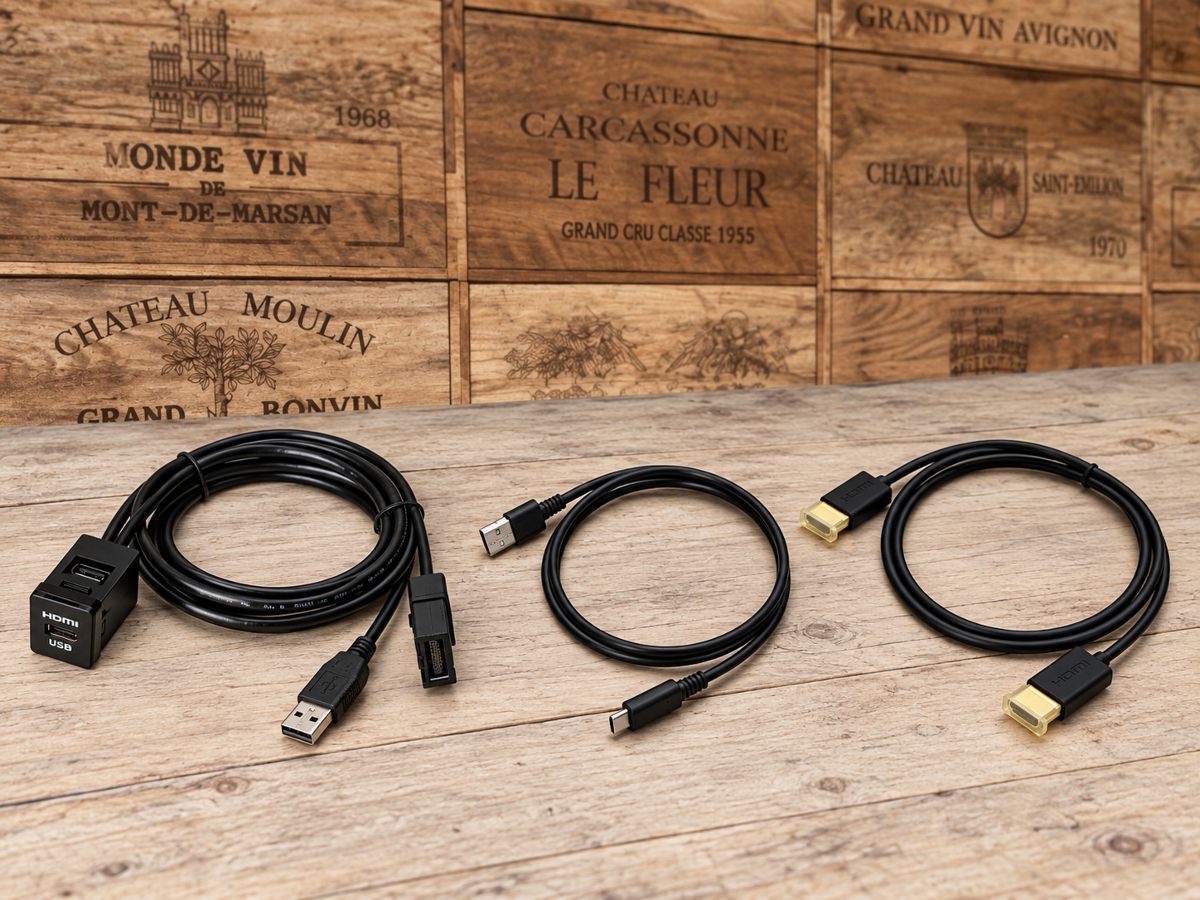
As beautiful as the original, it provides a more comfortable connection to your smartphone.
[Alpine Car Navigation System Dedicated USB-C/HDMI Built-in Unit VPC-Y630HU-CMR]
You’d like to connect your smartphone to an Alpine car navigation system to enjoy video and music. But you want to avoid having the connection cable hanging inside the car or having to search for the wiring every time you use it. That’s exactly where the VPC-Y630HU-CMR built-in unit with USB-C/HDMI connectivity is a great fit.
This is a connection unit designed to work with compatible Alpine car navigation systems from 2020 model year and later, and to fit into the small accessory socket area of Toyota vehicles. Since the USB-C and HDMI connector ports can be grouped into an easily accessible location, you can make the smartphone connection neatly while minimizing the “aftermarket look.”
Enjoy your smartphone’s video clearly and conveniently, even in the car
By connecting a compatible smartphone via HDMI, you can enjoy the smartphone’s videos and music on the car navigation display and through the in-car audio system. It’s useful for situations like watching your usual content on a larger screen during breaks on long-distance drives or while waiting in the car.
you can use it with USB-C-equipped iPhone models from iPhone 15 onward, as well as Android devices that support DisplayPort Alt Mode. Since the setup allows you to power the smartphone while outputting video, it’s also practical because you can use it without worrying about battery level.
However, not all USB-C-equipped Android devices support video output. It’s important to check the specifications of the smartphone you plan to use, as well as any required conversion adapters in advance.
It changes not only how it looks, but also everyday usability
The appeal of this product isn’t just that it adds a USB-C terminal and an HDMI terminal. By neatly housing the connection ports on the vehicle side, it becomes easier to plug and unplug cables, and the interior is less likely to get cluttered when it’s not in use.
Even in vehicles other than Toyota, installation is possible using the included universal panel. However, the actual installation location and whether modifications are required vary depending on the vehicle’s interior shape, available space, and the positional relationship with existing equipment. Choosing a position that won’t interfere with the factory controls and won’t get in the way while driving will lead to greater satisfaction after installation.
Because it’s a peripheral device, installation method matters
These built-in units are small parts, but where and in what orientation they’re installed will affect both usability and the final finish. You’ll want to check not only the visible areas, but also the cable routing to the car navigation system and how to prevent unnecessary force on the terminals.
At LOGON, we plan the installation method while confirming things such as the car navigation system model, vehicle model, the smartphone type, and how you usually want to enjoy video. If it were me, I wouldn’t just install it where there’s an available spot—I’d also look at the setup with the cables actually connected, and choose a position that’s easy to use and fits neatly.
If you’re unsure about compatibility or the installation position, it’s best not to decide based only on the parts—confirm the specifications of both the car navigation system and the vehicle first. Since you’ll be using the connection section every time, let’s finish it with both appearance and operability in mind.
Main Specifications / Specs
[Basic Information]
- Product name: Built-in USB/HDMI unit cable set for Alpine car navigation systems from 2020 model year onward (USB-C/HDMI connection)
- Model number: VPC-Y630HU-CMR
- Manufacturer: Alpine
- Type: Built-in USB-C/HDMI connection unit
[Compatibility / Fit]
- Compatible car navigation systems: Alpine car navigation systems compatible with model year 2020 and later
- Alpine car navigation systems from 2019 and earlier: ×
- Compatible smartphones: iPhone models from iPhone 15 onward; Android devices that support DisplayPort Alt Mode
- Toyota small accessory socket area: Supported
- Universal panel: Included
- Installation in vehicles other than Toyota: Supported after confirming the vehicle-side installation conditions
[Connections / Functions]
- USB-C connection: ○
- HDMI connection: ○
- Smartphone power during video output: ○
- USB-C/HDMI conversion adapter: Sold separately
- Recommended adapter: Apple genuine product or a compatible commercially available product with a USB power port
[Included Cables]
- KCU-Y630HU: 0.75 m
- KCU-472C: 1.0 m
- KCU-G61i: 2.0 m
| [Compatibility] |
Related Links
| Compatible vehicle model name | Model year | remarks |
|---|---|---|
| TOYOTA PRIUSZVW5#後期 | 2018-12 ~ 2022-12 | |
| TOYOTA LAND CRUISER PRADOGDJ/TRJ15#系後期2 | 2017-09 ~ 2024-04 | |
| TOYOTA RAV4MXAA/AXAH54 | 2019-04 ~ 2025-12 |