Built-in USB/HDMI Connection Unit (for Toyota accessory sockets) for 2013-2019 Alpine Navigation Systems, Android Connection Package VPC-Y62HU-Android
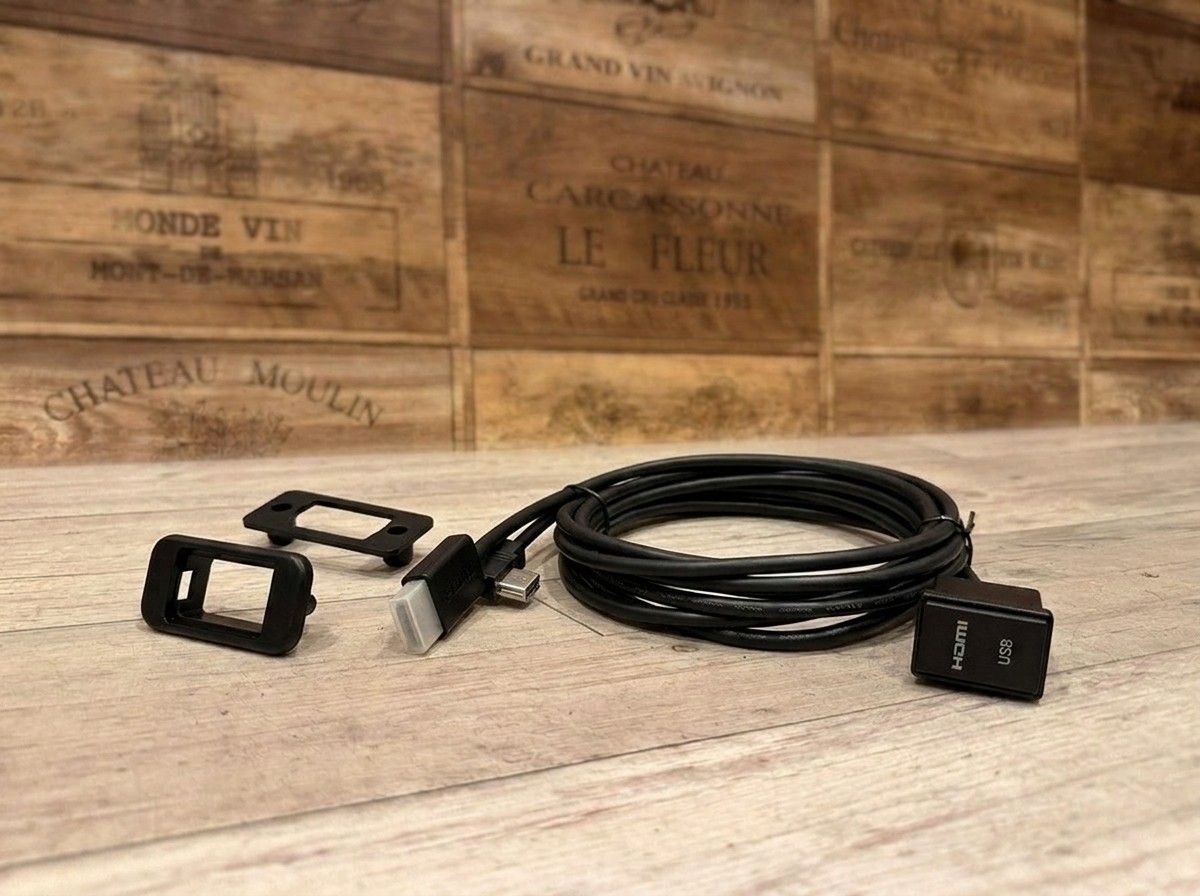
Bring your smartphone video and music to the navigation system’s large screen—one solution for charging, too, for comfortable use.
【Alpine VPC-Y62HU-Android | Built-in USB/HDMI Connection Unit for Alpine Car Navigators (2013–2019 Models Only)】
You want to connect your smartphone to your Alpine car navigation system, but you’d rather not have cables scattered around the cabin. That’s exactly what the Alpine VPC-Y62HU-Android is for.
This package is designed to connect compatible Alpine car navigation systems (2013–2019 models) with Android smartphones via HDMI. It lets you neatly house the USB/HDMI ports in the factory switch panel of Toyota vehicles. The great thing about this product is that, while minimizing the “aftermarket” look, you can enjoy the corresponding video and music from your smartphone on the navigation screen.
No visible cables—connect instantly when you want to use it
In addition to the USB/HDMI port integrated unit, the package includes an HDMI cable, a USB–Micro USB conversion cable, and an HDMI–HDMI [Type D] conversion cable. Connect a compatible Android smartphone to enjoy video and music, and charge it at the same time.
There’s no need to plug cables into the back of the navigation unit every time you use it, nor to leave long wiring exposed until you no longer need it. Since the ports fit into their designated positions, the daily usability is excellent—and the appearance inside the car looks quite natural as well. These kinds of accessory parts aren’t flashy products, but because you touch them every time, having them installed neatly makes a real difference in satisfaction.
By using the included universal mounting panel, this unit can also be installed in vehicles other than Toyota. However, depending on the panel shape on the vehicle side and the available installation space, you may need to consider modifications or installation methods.
Confirm compatibility between your navigation unit and smartphone
This product is for compatible Alpine car navigation systems manufactured between 2013 and 2019 only. It does not support the NX series models from 2020 to 2021. Also, depending on the connector/end support and video output support of the Android smartphone, as well as the apps and content you use, there may be limitations on display or playback.
Don’t assume that “Android always works the same way.” It’s safer to check the navigation unit’s model number and the smartphone specifications in advance. If I were choosing, I wouldn’t pick only the product first—I’d decide after looking at the combination of the navigation unit and smartphone you currently use.
At LOGON, we not only check compatibility, but also ensure that the ports can be positioned conveniently and that there’s no strain on existing wiring or factory functions before installation. It’s important not only to hide the cables, but also to finish the setup with ease of connection and serviceability in mind, so you can use it comfortably for a long time.
If you’re unsure about the navigation unit model number or the combination with your smartphone, please feel free to consult us once. While we ask about how you actually plan to use it, we’ll honestly guide you on whether this unit will work for your setup or if a different connection method would be better.
Main Specifications
【Basic Information】
- Product name: Built-in USB/HDMI Connection Unit for Alpine Car Navigators (2013–2019 Models Only) — Android Connection Package
- Model number: VPC-Y62HU-Android
- Manufacturer: Alpine
- Type: USB/HDMI port integrated connection unit
【Main Components】
- USB/HDMI port integrated unit: 1.75 m
- HDMI cable: 1.0 m
- USB–Micro USB conversion cable: 1.0 m
- HDMI–HDMI [Type D] conversion cable
- Universal mounting panel
【Installation / Compatibility】
- Compatible Alpine car navigation systems manufactured between 2013 and 2019
- For Toyota vehicle accessory sockets
- Universal mounting panel: Included
- Installation in vehicles other than Toyota: Supported
- NX series (2020–2021 models): Not supported (×)
- Depending on the vehicle or installation location, modifications and/or compatibility checks may be required
Related Links
| Compatible vehicle model name | Model year | remarks |
|---|---|---|
| TOYOTA AQUANHP10中期 | 2014-12 ~ 2017-06 | |
| TOYOTA AQUA10系 | 2011-12 ~ 2014-11 | |
| TOYOTA AQUANHP10・10H | 2017-06 ~ 2021-06 | |
| TOYOTA AQUAAHX#B | 2021-07 ~ current | |
| TOYOTA ALPHARDAYH/GGH/AGH3#系前期 | 2015-01 ~ 2017-12 | |
| TOYOTA ALPHARDAYH/GGH/AGH3##系後期 | 2018-01 ~ 2023-06 | |
| TOYOTA VELLFIREAYH/GGH/AGH3##系後期 | 2018-01 ~ 2023-06 | |
| TOYOTA VELLFIREAYH/GGH/AGH3#系前期 | 2015-01 ~ 2017-12 | |
| TOYOTA VITZNSP/KSP13#系後期 | 2017-01 ~ 2020-03 | |
| TOYOTA VITZNHP130 | 2017-01 ~ 2020-03 | |
| TOYOTA VOXYZRR70系 | 2007-06 ~ 2014-01 | |
| TOYOTA VOXYZWR/MZRA90W | 2022-01 ~ current | |
| TOYOTA VOXYZWR/ZRR8#系前期 | 2014-01 ~ 2017-06 | |
| TOYOTA VOXYZWR/ZRR8#系後期 | 2017-07 ~ 2021-12 | |
| TOYOTA VOXYZWR90系 | 2021-12 ~ 2021-12 | |
| TOYOTA NOAHZWR/ZRR8#系後期 | 2017-07 ~ 2021-12 | |
| TOYOTA NOAHZWR/ZRR8#系前期 | 2014-01 ~ 2017-06 | |
| TOYOTA NOAHZWR/ZRR9#系 | 2022-01 ~ current | |
| TOYOTA ESQUIREZWR/ZRR8#系後期 | 2017-07 ~ 2021-12 | |
| TOYOTA ESQUIREZWR/ZRR8#系前期 | 2014-10 ~ 2017-06 | |
| TOYOTA TANKM900A/M910A | 2016-11 ~ 2020-09 | |
| TOYOTA ROOMYM900A・M910A前期 | 2016-11 ~ 2020-08 | |
| TOYOTA ROOMYM900A ・M910A後期 | 2020-09 ~ current | |
| TOYOTA HARRIER6AA-AXUH80/85(2020-06~) | 2020-06 ~ current | |
| TOYOTA HARRIER6BA-MXUA80 | 2020-06 ~ 2026-08 | |
| TOYOTA HARRIERASU/AVU/ZSU6# | 2017-06 ~ 2020-05 | |
| TOYOTA HARRIERAVU65/ZSU6# | 2013-12 ~ 2017-05 | |
| TOYOTA HIACE200系 4.5型 | 2017-11 ~ current | |
| TOYOTA HIACE200系 4型 | 2013-12 ~ 2017-11 | |
| TOYOTA REGIUSACE200系後期 | 2013-12 ~ 2020-04 | |
| TOYOTA REGIUSACE200系前期 | 2004-08 ~ 2013-12 | |
| TOYOTA HILUXGUN125後期 | 2020-08 ~ 2026-05 | |
| TOYOTA HILUXGUN125前期 | 2017-09 ~ 2020-07 | |
| TOYOTA PRIUSZVW5#前期 | 2015-12 ~ 2018-11 | |
| TOYOTA PRIUS ALPHAZVW4#後期 | 2014-12 ~ 2021-03 | |
| TOYOTA PRIUS ALPHAZVW4#前期 | 2011-05 ~ 2014-11 | |
| TOYOTA CHRZYX10・11、NGX50 | 2019-10 ~ 2023-08 | |
| TOYOTA CHRZYX10,NGX50 | 2016-12 ~ 2019-09 |