USB-C/HDMI Connection for 2020 and later Alpine Navigation Systems. Built-in USB/HDMI Unit (for Toyota Accessory Sockets). Cable Set VPC-Y620HU-CMR.
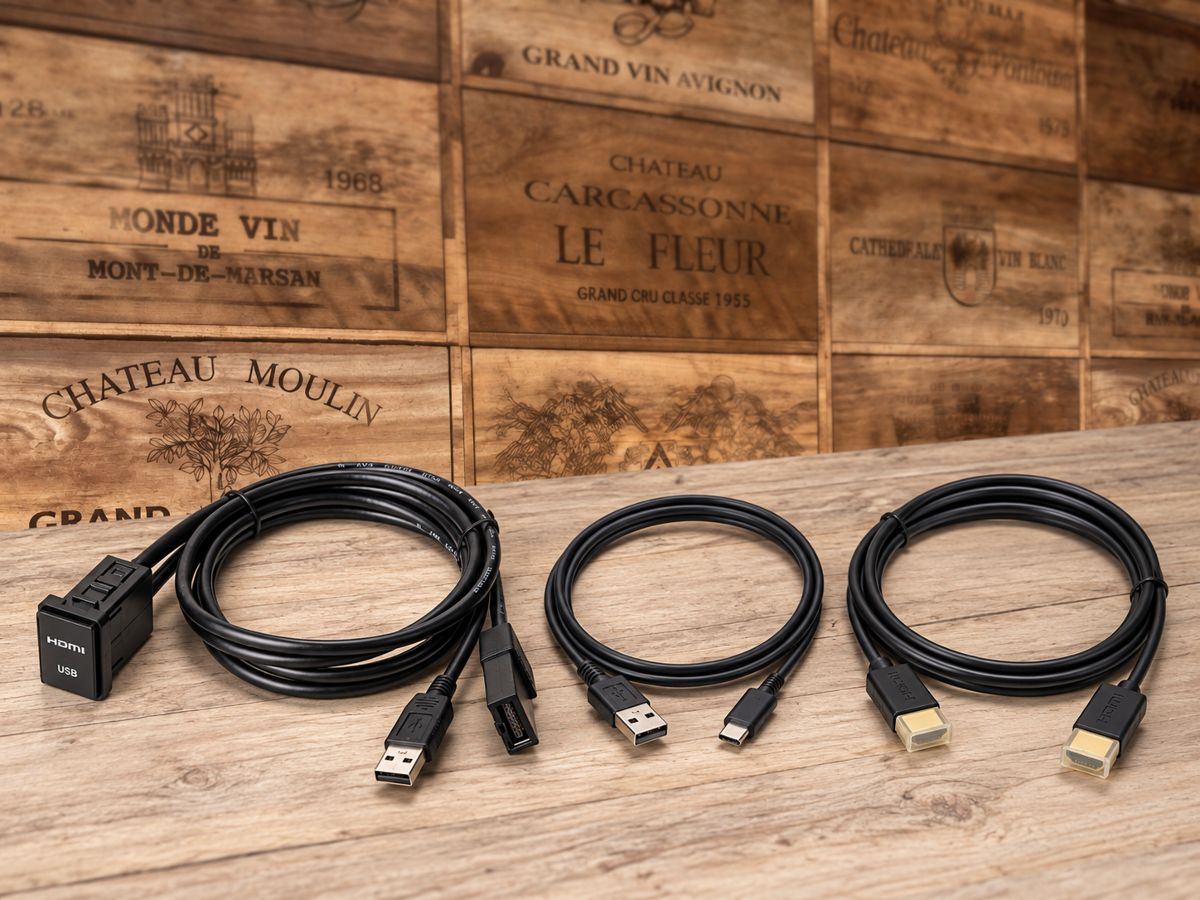
Neatly built in USB-C and HDMI ports to make in-car entertainment easier to use.
【2020 Model Year and Later Alpine Car Navigation Dedicated USB-C/HDMI Built-in Connection Unit VPC-Y620HU-CMR】
You want to enjoy your smartphone’s video and music on the screen of your Alpine car navigation. But you’d like to avoid having the connection cable left exposed in the vehicle. That’s exactly where the VPC-Y620HU-CMR built-in unit compatible with USB-C/HDMI connections comes in.
Because it can be neatly fitted into the accessory socket area of Toyota vehicles, you can aim for a natural finish with minimal “aftermarket” feel. When in use, connect to the terminals near your hand, and when not in use, the wiring is less likely to stand out—an excellent point. If you want to make smartphone integration easier while keeping a look that feels OEM-like, this kind of built-in type is the way to go.
This product is a cable set for connecting a smartphone with a USB-C port to an Alpine car navigation system compatible with model years 2020 and later via HDMI. It can be used with USB-C-equipped models from iPhone 15 onward and with Android devices that support DisplayPort Alt Mode. In addition to displaying high-quality video on the navigation screen, it can also support charging when the required devices are correctly combined. You’ll find it easier to enjoy the content from your everyday smartphone in the car, such as during long drives or while taking a break.
The set includes a built-in USB/HDMI connection unit, a USB-C to A conversion cable, and an HDMI cable. It also comes with a universal panel that allows installation outside the OEM position, so you can consider it based on your vehicle’s shape and a convenient mounting location. However, with these peripheral units, the actual usability improves significantly when you consider not only whether you can connect it, but also the terminal orientation, cable routing, and even where you’ll place the smartphone when mounted.
Note that this product is not compatible with Alpine car navigation systems from 2019 or earlier. Also, the USB-C/HDMI conversion adapter is sold separately. For example, you’ll need an Apple genuine adapter for iPhones, and a DisplayPort Alt Mode–compatible adapter for Android devices—choose an adapter that matches the smartphone you use. Including products with a USB power port, it’s important to confirm compatibility with your specific device in advance.
At LOGON, we consider not only an installation that looks good but also a setup that’s easy to use in daily life, while checking the navigation model number and the available installation space on the vehicle side. If you’re going to install it, you’ll want a form where the cable won’t get in the way and you can use it naturally every time you get in the car. If you’d like to achieve a clean finish for Alpine car navigation smartphone integration and HDMI input, please contact us with your vehicle model, model year, and navigation model number.
Main Specifications / Specs
【Basic Information】
- Product name: 2020 model year and later Alpine car navigation dedicated USB-C/HDMI connection built-in USB/HDMI unit cable set
- Model number: VPC-Y620HU-CMR
- Manufacturer: Alpine
- Type: Built-in connection unit for Toyota vehicle accessory socket
【Compatible Devices】
- Compatible car navigation: Alpine car navigation compatible with model years 2020 and later
- Alpine car navigation from 2019 or earlier: ×
- iPhone: USB-C-equipped models from iPhone 15 onward
- Android: Android devices that support DisplayPort Alt Mode
【Set Contents】
- Built-in USB/HDMI connection unit KCU-Y620HU: 0.75 m
- USB-C to A conversion cable KCU-472C: 1.0 m
- HDMI cable KCU-G61i: 2.0 m
- Universal panel compatible with installation outside the OEM position: Yes
【Additional Items Required】
- USB-C/HDMI conversion adapter: Sold separately
- Conversion adapter compatible with the device you use: Required
Related Links
| Compatible vehicle model name | Model year | remarks |
|---|---|---|
| TOYOTA AQUANHP10中期 | 2014-12 ~ 2017-06 | |
| TOYOTA AQUA10系 | 2011-12 ~ 2014-11 | |
| TOYOTA AQUANHP10・10H | 2017-06 ~ 2021-06 | |
| TOYOTA AQUAAHX#B | 2021-07 ~ current | |
| TOYOTA ALPHARDAYH/GGH/AGH3#系前期 | 2015-01 ~ 2017-12 | |
| TOYOTA ALPHARDAYH/GGH/AGH3##系後期 | 2018-01 ~ 2023-06 | |
| TOYOTA VELLFIREAYH/GGH/AGH3##系後期 | 2018-01 ~ 2023-06 | |
| TOYOTA VELLFIREAYH/GGH/AGH3#系前期 | 2015-01 ~ 2017-12 | |
| TOYOTA VITZNSP/KSP13#系後期 | 2017-01 ~ 2020-03 | |
| TOYOTA VITZNHP130 | 2017-01 ~ 2020-03 | |
| TOYOTA VOXYZRR70系 | 2007-06 ~ 2014-01 | |
| TOYOTA VOXYZWR/MZRA90W | 2022-01 ~ current | |
| TOYOTA VOXYZWR/ZRR8#系前期 | 2014-01 ~ 2017-06 | |
| TOYOTA VOXYZWR/ZRR8#系後期 | 2017-07 ~ 2021-12 | |
| TOYOTA VOXYZWR90系 | 2021-12 ~ 2021-12 | |
| TOYOTA NOAHZWR/ZRR8#系後期 | 2017-07 ~ 2021-12 | |
| TOYOTA NOAHZWR/ZRR8#系前期 | 2014-01 ~ 2017-06 | |
| TOYOTA NOAHZWR/ZRR9#系 | 2022-01 ~ current | |
| TOYOTA ESQUIREZWR/ZRR8#系後期 | 2017-07 ~ 2021-12 | |
| TOYOTA ESQUIREZWR/ZRR8#系前期 | 2014-10 ~ 2017-06 | |
| TOYOTA TANKM900A/M910A | 2016-11 ~ 2020-09 | |
| TOYOTA ROOMYM900A・M910A前期 | 2016-11 ~ 2020-08 | |
| TOYOTA ROOMYM900A ・M910A後期 | 2020-09 ~ current | |
| TOYOTA HARRIER6AA-AXUH80/85(2020-06~) | 2020-06 ~ current | |
| TOYOTA HARRIER6BA-MXUA80 | 2020-06 ~ 2026-08 | |
| TOYOTA HARRIERASU/AVU/ZSU6# | 2017-06 ~ 2020-05 | |
| TOYOTA HARRIERAVU65/ZSU6# | 2013-12 ~ 2017-05 | |
| TOYOTA HIACE200系 4.5型 | 2017-11 ~ current | |
| TOYOTA HIACE200系 4型 | 2013-12 ~ 2017-11 | |
| TOYOTA REGIUSACE200系後期 | 2013-12 ~ 2020-04 | |
| TOYOTA REGIUSACE200系前期 | 2004-08 ~ 2013-12 | |
| TOYOTA HILUXGUN125後期 | 2020-08 ~ 2026-05 | |
| TOYOTA HILUXGUN125前期 | 2017-09 ~ 2020-07 | |
| TOYOTA PRIUSZVW5#前期 | 2015-12 ~ 2018-11 | |
| TOYOTA PRIUS ALPHAZVW4#後期 | 2014-12 ~ 2021-03 | |
| TOYOTA PRIUS ALPHAZVW4#前期 | 2011-05 ~ 2014-11 | |
| TOYOTA CHRZYX10・11、NGX50 | 2019-10 ~ 2023-08 | |
| TOYOTA CHRZYX10,NGX50 | 2016-12 ~ 2019-09 |