Built-in USB/HDMI connection unit with amber LED lighting for Alpine car navigation systems (KCU-Y630HU-LED-A) for Jimny JC74/JB64/74
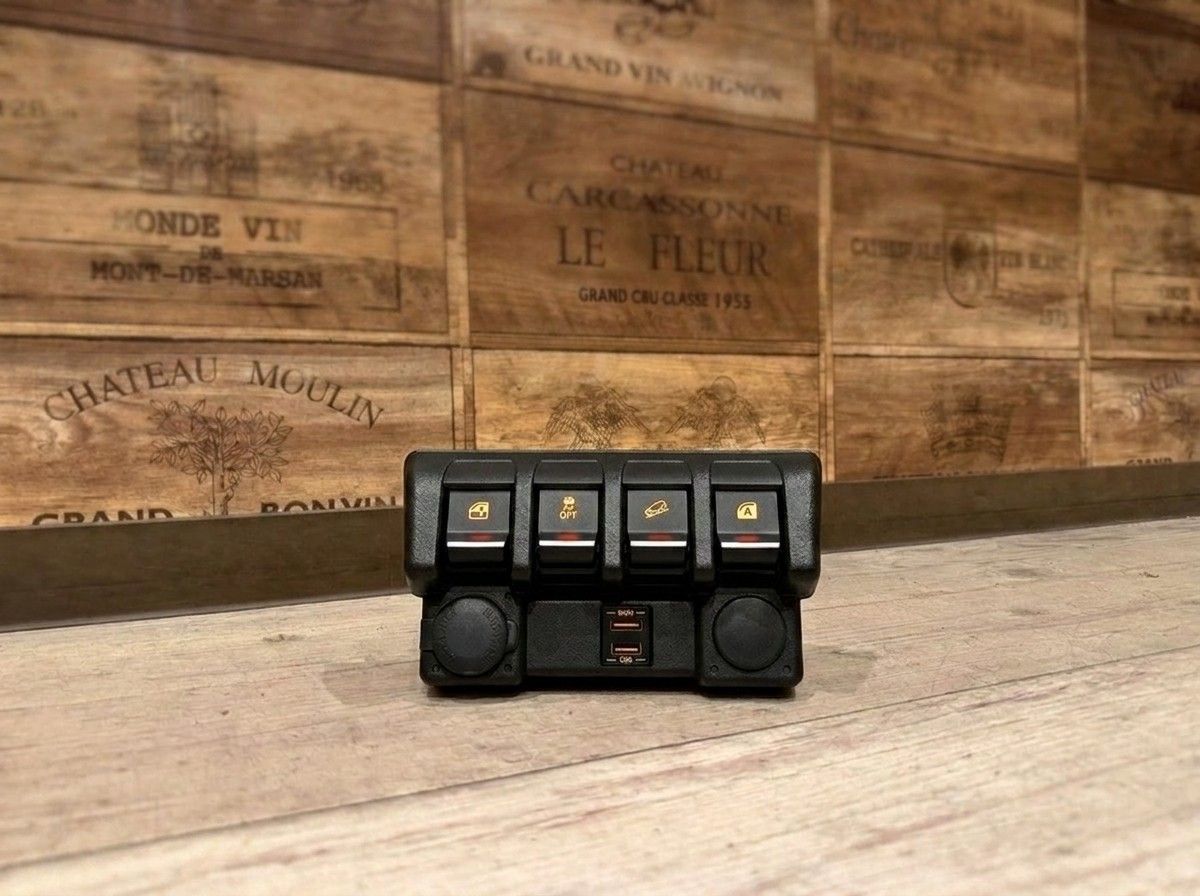
Neatly fits in place, with the socket made easy to find by the soft amber glow.
【Jimny JC74 / JB64 / JB74 | Alpine Car Navi Dedicated Amber LED Built-in USB / HDMI Connection Unit KCU-Y630HU-LED-A】
You want to connect your smartphone to your Alpine car navigation system to enjoy music and video. But you’d rather not leave cables hanging inside the car. This is the USB / HDMI connection unit for the Jimny JC74 / JB64 / JB74.
Using KCU-Y630-JI-64, the USB and HDMI ports are neatly built into the genuine compact switch panel. While minimizing the “aftermarket look,” it provides connection ports that are easy to reach whenever you need them. In addition to enjoying your smartphone’s music and video on the car navigation screen, in compatible connection environments you can also charge your smartphone while watching video.
Amber LED that makes the ports easy to find even in a dark cabin
The highlight of this model is the amber LED lighting adopted at the port area.
At night or in dim parking lots, USB and HDMI sockets can be hard to see, and many people probably have experience searching with their smartphone light turned on. The soft amber glow makes it easier to confirm the port positions, improving not only the look but also day-to-day usability.
This is not a part designed to glow flashy; it’s an item that naturally blends into the Jimny’s interior while making the necessary areas subtly and clearly visible. It reduces the small inconveniences you feel every time you use a cable, helping you use smartphone integration even more easily.
Checking installation conditions is important for a clean, neat fit
When installing into the genuine compact switch panel, there are conditions depending on the vehicle specifications and the usage status of existing switches. Also, the functions available may differ depending on the smartphone model, the cables used, and the car navigation system connected to.
With these kinds of peripheral units, it’s not just about choosing the product—where and how you place it, and how you manage the wiring, will change both usability and the final finish. At LOGON, we check the actual vehicle specifications and your current navigation environment, and we’ll think together about a practical, no-stress installation method.
For me, on a Jimny that I use frequently for smartphone integration, I’d finish it neatly with this built-in type instead of leaving cables exposed. Since it’s something you touch every time, I want to care about both appearance and ease of use.
Main Specifications
【Basic Information】
- Product name: Jimny JC74 / JB64 / JB74 Alpine car navi dedicated Amber LED lighting built-in USB / HDMI connection unit
- Model number: KCU-Y630HU-LED-A
- Included installation kit: KCU-Y630-JI-64
- Lighting color: Amber
- Cable length: 1.75 m
【Connections / Functions】
- USB connection: Available
- HDMI connection: Available
- Smartphone charging: Usable with compatible connection environments
- Installation method: Built-in installation into the genuine compact switch panel
【Compatibility Conditions】
- Compatible with Alpine car navigation systems installed in vehicles manufactured from 2020 onward
- Alpine display audio: Not supported
- For display audio, use KCU-Y630DA
- There are conditions for installing into the genuine compact switch panel
Because confirmation may be required depending on the vehicle specifications and the car navigation model, when you inquire please check the vehicle model, grade/type, year, and the Alpine car navigation system you currently have installed. We will guide you not only to a workable method, but also to a clean, neat fit—so you can use it comfortably for a long time.
Related Links
| Compatible vehicle model name | Model year | remarks |
|---|---|---|
| TOYOTA PRIUSZVW5#後期 | 2018-12 ~ 2022-12 | |
| TOYOTA LAND CRUISER PRADOGDJ/TRJ15#系後期2 | 2017-09 ~ 2024-04 | |
| TOYOTA RAV4MXAA/AXAH54 | 2019-04 ~ 2025-12 | |
| HONDA WR-VDG系 | 2024-03 ~ current | |
| NISSAN SERENAC28 | 2022-12 ~ current | |
| SUZUKI JIMNYJB64 | 2018-07 ~ current | |
| SUZUKI JIMNY SIERRAJB74 | 2018-07 ~ current | |
| SUZUKI JIMNY NOMADEFC | 2025-04 ~ current |