Built-in USB/HDMI Connection Unit for Toyota Accessory Sockets (2020 and later Alpine Navigation Systems) with iPhone Connection Package (VPC-Y620HU-iPhone)
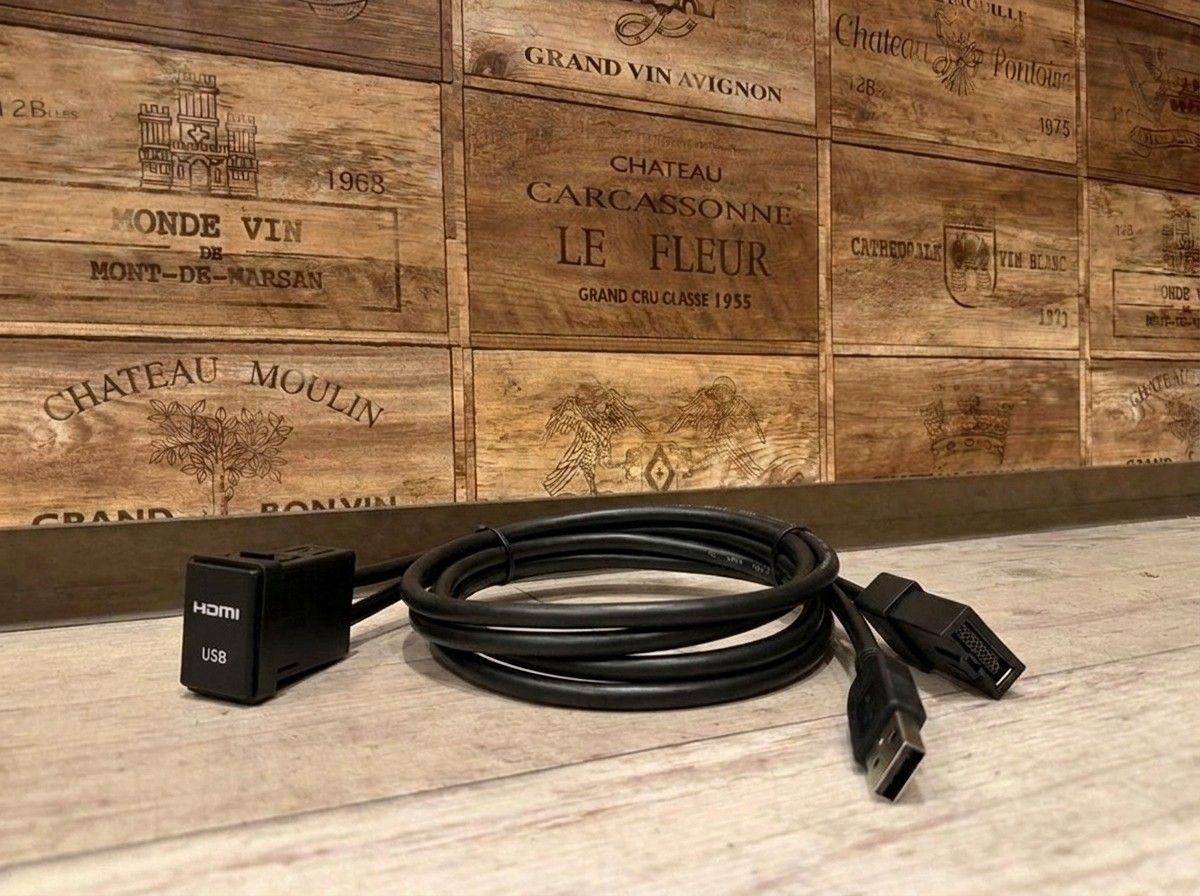
With a clean, OEM-style finish, enjoy your iPhone’s music and videos smartly in the car too.
【Enjoy iPhone Videos and Music with an Alpine Car Navigation System Built-in USB/HDMI Connection Unit VPC-Y620HU-iPhone】
Every time you use your iPhone in the car, the USB cable and HDMI cable tend to get scattered around your feet or near the center console. If you want to solve that inconvenience in a neat, tidy way, this VPC-Y620HU-iPhone, dedicated to Alpine car navigation systems made in 2020 or later is for you.
This built-in type fits into the accessory socket area of Toyota vehicles, allowing you to group the USB and HDMI terminals in convenient positions. It’s easier to achieve a natural look with less “aftermarket” feel, and you can connect the cables only when you need them. For anyone who wants to keep the area around the navigation system clean, these small details make a surprisingly big difference.
By connecting an iPhone with a Lightning connector via HDMI, you can enjoy compatible videos and music on the Alpine car navigation screen and through the in-car audio system. It’s set up so you can naturally connect your iPhone to the car navigation’s entertainment features—such as watching videos while parked or playing the music you normally listen to in the car. Because it also supports charging while you enjoy video, it remains convenient even on long drives.
Using the included universal panel, you can also consider installing it in locations other than the original accessory socket position. For vehicles other than Toyota as well, you may be able to consider installation if the conditions—such as mounting space and panel shape—are met; however, the required modifications will vary depending on the vehicle model and interior shape. It’s important to decide the installation position not only for appearance, but also for ease of plugging/unplugging the cables, interference with nearby switches, and future serviceability.
Although this product is a connection unit, your actual satisfaction will vary significantly depending on “where and how you place it.” If it were me, I wouldn’t just attach it to an empty spot—I’d prioritize a position that’s easy to handle from the driver’s seat and where the wiring won’t stand out when you’re not using it. At LOGON, we work with you to think through a reasonable installation method by checking your vehicle’s interior, the car navigation model number, and how you typically use your iPhone.
Please note that an Apple genuine Lightning HDMI conversion adapter for iPhone is required separately for the connection. The conversion adapter is not included with this product. Also, depending on the apps you use, streaming services, and the specifications of the content itself, you may not be able to display video. To be safe—including compatibility with your Alpine car navigation—check the navigation model and the installation conditions on the vehicle before purchasing.
Main Specifications
【Basic Information】
- Product name: iPhone connection package — built-in USB/HDMI connection unit dedicated to Alpine car navigation systems made in 2020 or later
- Model number: VPC-Y620HU-iPhone
- Manufacturer: ALPINE
- Type: Built-in USB/HDMI connection unit
- Compatible devices: iPhones equipped with a Lightning connector
【Installation / Compatibility】
- Compatible navigation systems: Alpine car navigation systems compatible with models made in 2020 or later
- Standard installation position: Toyota vehicle accessory socket area
- Universal panel: Available
- Vehicle modification: Varies depending on vehicle model, installation position, and interior shape
【Included Cables】
- Built-in USB/HDMI connection unit: 1.75 m
- HDMI cable: 1.0 m
- Lightning cable for iPod/iPhone: 1.0 m
【Items Required Separately】
- Apple genuine Lightning HDMI conversion adapter for iPhone: Sold separately
Related Links
| Compatible vehicle model name | Model year | remarks |
|---|---|---|
| TOYOTA AQUANHP10中期 | 2014-12 ~ 2017-06 | |
| TOYOTA AQUA10系 | 2011-12 ~ 2014-11 | |
| TOYOTA AQUANHP10・10H | 2017-06 ~ 2021-06 | |
| TOYOTA AQUAAHX#B | 2021-07 ~ current | |
| TOYOTA ALPHARDAYH/GGH/AGH3#系前期 | 2015-01 ~ 2017-12 | |
| TOYOTA ALPHARDAYH/GGH/AGH3##系後期 | 2018-01 ~ 2023-06 | |
| TOYOTA VELLFIREAYH/GGH/AGH3##系後期 | 2018-01 ~ 2023-06 | |
| TOYOTA VELLFIREAYH/GGH/AGH3#系前期 | 2015-01 ~ 2017-12 | |
| TOYOTA VITZNSP/KSP13#系後期 | 2017-01 ~ 2020-03 | |
| TOYOTA VITZNHP130 | 2017-01 ~ 2020-03 | |
| TOYOTA VOXYZRR70系 | 2007-06 ~ 2014-01 | |
| TOYOTA VOXYZWR/MZRA90W | 2022-01 ~ current | |
| TOYOTA VOXYZWR/ZRR8#系前期 | 2014-01 ~ 2017-06 | |
| TOYOTA VOXYZWR/ZRR8#系後期 | 2017-07 ~ 2021-12 | |
| TOYOTA VOXYZWR90系 | 2021-12 ~ 2021-12 | |
| TOYOTA NOAHZWR/ZRR8#系後期 | 2017-07 ~ 2021-12 | |
| TOYOTA NOAHZWR/ZRR8#系前期 | 2014-01 ~ 2017-06 | |
| TOYOTA NOAHZWR/ZRR9#系 | 2022-01 ~ current | |
| TOYOTA ESQUIREZWR/ZRR8#系後期 | 2017-07 ~ 2021-12 | |
| TOYOTA ESQUIREZWR/ZRR8#系前期 | 2014-10 ~ 2017-06 | |
| TOYOTA TANKM900A/M910A | 2016-11 ~ 2020-09 | |
| TOYOTA ROOMYM900A・M910A前期 | 2016-11 ~ 2020-08 | |
| TOYOTA ROOMYM900A ・M910A後期 | 2020-09 ~ current | |
| TOYOTA HARRIER6AA-AXUH80/85(2020-06~) | 2020-06 ~ current | |
| TOYOTA HARRIER6BA-MXUA80 | 2020-06 ~ 2026-08 | |
| TOYOTA HARRIERASU/AVU/ZSU6# | 2017-06 ~ 2020-05 | |
| TOYOTA HARRIERAVU65/ZSU6# | 2013-12 ~ 2017-05 | |
| TOYOTA HIACE200系 4.5型 | 2017-11 ~ current | |
| TOYOTA HIACE200系 4型 | 2013-12 ~ 2017-11 | |
| TOYOTA REGIUSACE200系後期 | 2013-12 ~ 2020-04 | |
| TOYOTA REGIUSACE200系前期 | 2004-08 ~ 2013-12 | |
| TOYOTA HILUXGUN125後期 | 2020-08 ~ 2026-05 | |
| TOYOTA HILUXGUN125前期 | 2017-09 ~ 2020-07 | |
| TOYOTA PRIUSZVW5#前期 | 2015-12 ~ 2018-11 | |
| TOYOTA PRIUS ALPHAZVW4#後期 | 2014-12 ~ 2021-03 | |
| TOYOTA PRIUS ALPHAZVW4#前期 | 2011-05 ~ 2014-11 | |
| TOYOTA CHRZYX10・11、NGX50 | 2019-10 ~ 2023-08 | |
| TOYOTA CHRZYX10,NGX50 | 2016-12 ~ 2019-09 |