Built-in USB/HDMI Connection Unit for Toyota Accessory Sockets (2013-2019 Alpine Navigation Systems) with iPhone Connection Package (VPC-Y62HU-iPhone)
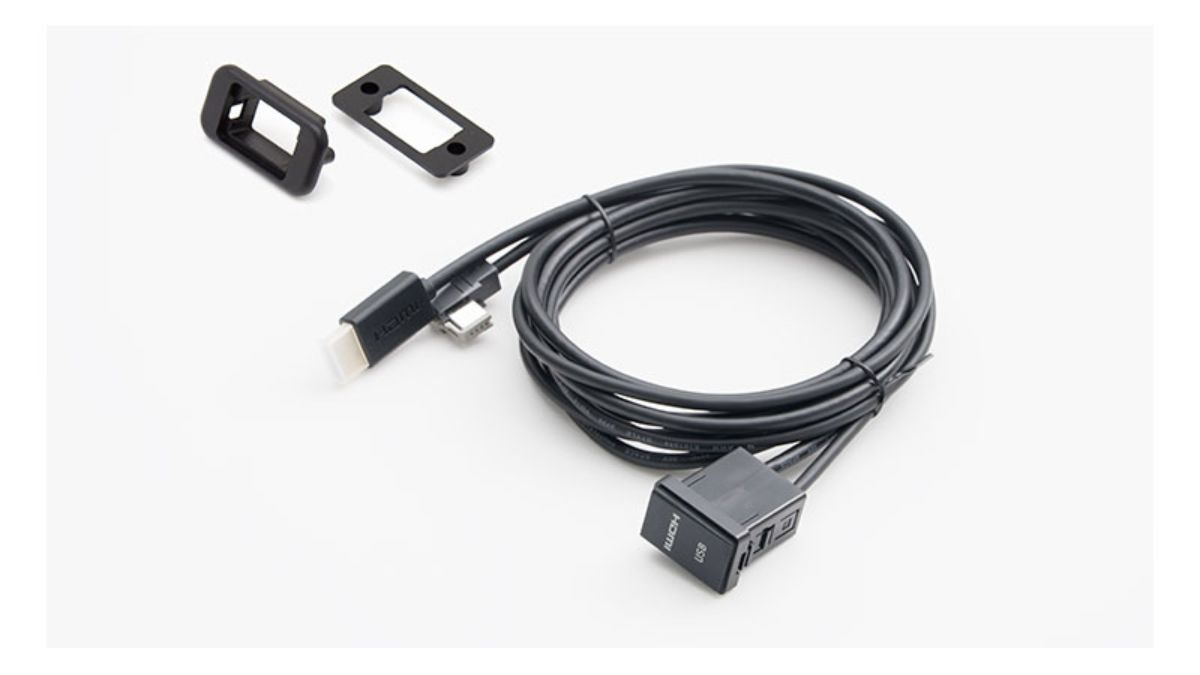
Fits neatly and cleanly like genuine, so you can enjoy your iPhone’s video and music smartly.
【Alpine VPC-Y62HU-iPhone | Built-in USB/HDMI Connection Unit for Alpine Car Navigators (2013–2019)】
You want to enjoy iPhone video and music in your car, but you don’t want an installation where the cables are visible or a finish that feels strongly “aftermarket.” That’s exactly what the Alpine VPC-Y62HU-iPhone is for.
This is a package designed to connect supported Alpine car navigation models manufactured between 2013 and 2019 with an iPhone equipped with a Lightning connector. By using the accessory socket area in Toyota vehicles, you can build in the USB/HDMI terminals—so you connect your iPhone only when you need it, and when you don’t, you can keep the interior looking neat and tidy. Another major benefit of this product is that the wiring is less noticeable, making it easier to achieve a natural look that closely resembles factory equipment.
With HDMI connection, you can enjoy compatible content from your iPhone on the car navigation screen and through the in-car audio system. Since you can charge while viewing video, it’s also convenient for long-distance drives or during breaks when passengers want to watch videos. Video streaming services may not be displayable depending on app/content output restrictions and on iPhone or iOS specifications.
Compatible with installation in vehicles other than Toyota
By using the included universal panel, you can also consider installation locations other than the factory accessory socket position. Even in vehicles other than Toyota, if there is an appropriate space on the vehicle side, installation can be done in a way that balances ease of use and appearance.
However, with connection units like this, simply having the product isn’t enough to ensure a clean fit. Depending on the installation location, the ease of plugging and unplugging the terminals, how the cables look, and how well the unit fits with surrounding panels will vary. If it were me, I would decide the position after confirming exactly where I normally plan to place the iPhone. It’s the kind of part you should think about before installing so it won’t become inconvenient to use later.
At LOGON, we will guide you on the installation method after confirming the compatible car navigation model, the installation space on the vehicle side, and the existing wiring and interior shapes. We won’t decide based on compatibility alone—we’ll consider together a finish that you can use naturally every day and that won’t spoil the atmosphere inside the car.
Please note that it is not compatible with the NX series of Alpine car navigation models manufactured in 2020–2021. Also, the Apple genuine Lightning HDMI conversion adapter required for HDMI connection with the iPhone is not included, so you need to prepare it separately. iPhones with a USB-C connector are not included as Lightning-connection targets for this package.
If you’re unsure about the compatible model or the installation position, please check the car navigation model number and your vehicle’s make/year, and contact us for advice. I believe it’s better to install it in a way that matches how you’ll actually use it, rather than choosing parts purely based on fit—so you can enjoy it comfortably for a long time.
Main Specifications / Specs
【Basic Information】
- Product name: Built-in USB/HDMI Connection Unit for Alpine Car Navigators (2013–2019) — iPhone Connection Package
- Model number: VPC-Y62HU-iPhone
- Manufacturer: Alpine
- Type: Built-in USB/HDMI Connection Unit
【Compatibility / Connection】
- Compatible car navigation: Supported Alpine car navigation models manufactured between 2013 and 2019
- NX series manufactured in 2020–2021: ×
- Compatible connector: Lightning
- iPhones with USB-C connector: ×
- Video connection: HDMI
- Charging while viewing: ○
- Installation at Toyota vehicle accessory socket area: ○
- Installation at a different location using the universal panel: ○
- Apple genuine Lightning HDMI conversion adapter: Sold separately
【Included Items】
- Built-in USB/HDMI connection unit: 1.75 m
- HDMI cable: 1.0 m
- Lightning cable for iPod/iPhone: 1.0 m
- Universal mounting panel